A prepaid wallet you can drop into any product.
Wallet Solution is a stored-value wallet shipped as two parts: an embeddable SDK that re-skins to any host brand, and an admin portal that runs the program behind it. Fund once, pay instantly. It went live themed for a metro operator ticketing and a a logistics partner prepay-&-ship flow.
One wallet, two halves.
A merchant wants its customers to keep money on file and pay in one tap. The Wallet Solution delivers that as a drop-in SDK on the consumer side, an operator portal on the business side, and a theming layer that makes the same wallet wear any brand.
The wallet SDK
An embeddable wallet, loading inside the host app on mobile web or desktop, that handles balance, top-up, transaction history, and pay.
The admin portal
The back office that runs the program: onboard merchants, watch spend, remit funds, and reconcile.
Whitelabel
The same SDK re-skinned to the host's identity, shipped as a metro operator and a logistics partner, "Powered by the payments fintech."
Paying fresh, every single time.
Think high-frequency, low-value payments: a daily metro ride, a stream of shipments. Running a full payment every time is friction. The customer re-authenticates each tap; the merchant can't hold a balance, run prepaid pricing, or reward loyalty.
- Re-auth on every transaction: a redirect or card entry for even a ₹25 ride.
- No stored value: nothing to pay from instantly; every payment starts at zero.
- Merchants can't run prepaid: no balance means no top-up offers, no float, no loyalty.
- Spend & settlement opaque: wallet activity and merchant payouts tracked outside any one system.
What the wallet had to do.
Fund once, pay many
A balance the customer tops up, then spends in one tap with no re-auth.
Drop into any product
One SDK that loads inside the host app and wears its brand, on mobile web or desktop.
Run the program
An admin portal to onboard merchants, watch spend, remit, and reconcile.
The Wallet SDK
The consumer side: an embedded wallet that lives inside the host product. This unit covers the wallet screen, the frictionless top-up, the one-tap pay that issues a metro QR ticket, and how the same SDK renders on mobile web and desktop.
Balance first, history below.
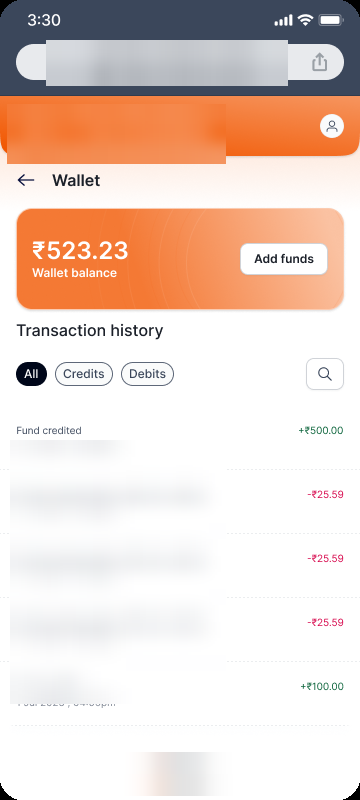
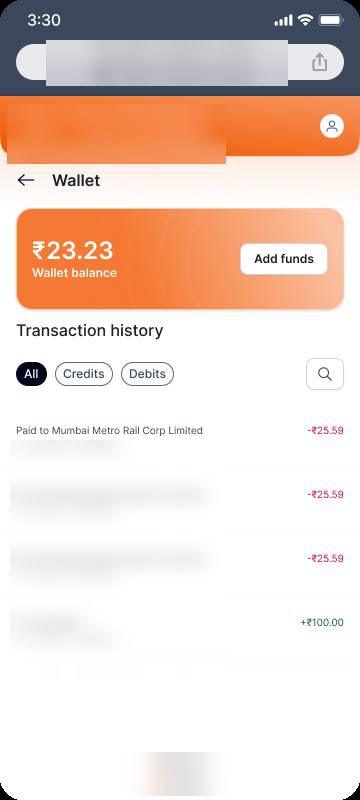
The wallet opens to one number (what's available) and a single primary action, Add funds. Below it, every credit and debit in a filterable history (All / Credits / Debits), so the same screen answers "how much do I have?" and "where did it go?". Here it is empty and funded.
 Click to zoom
A near-empty balance after a run of metro rides, with Add funds sitting right on the balance card.
Click to zoom
After top-up, the balance jumps and the fund-credited entry is the newest line in history.
Top up in two taps, not a form.
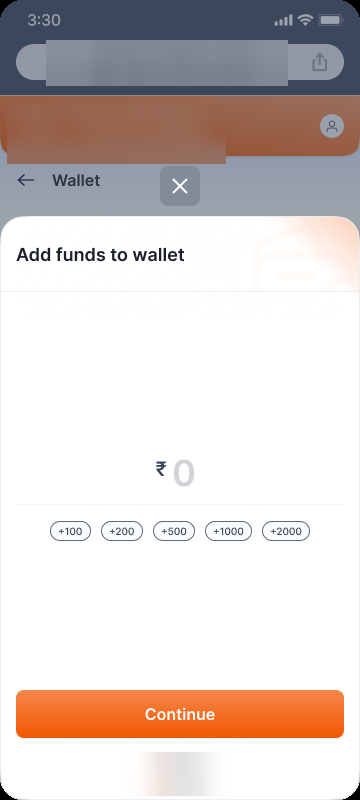
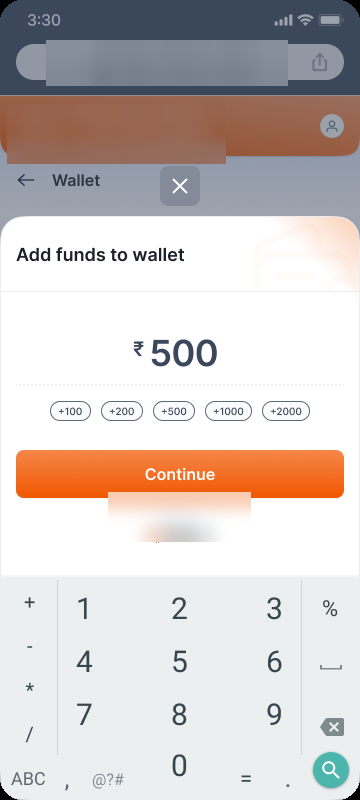
Adding money is the one flow that gates everything else, so it's stripped to the bone: a bottom-sheet, quick-amount chips (+100 to +2000), a single big number, Continue. No typing unless you want a custom amount.
Tap Add funds on the balance card.
Quick chip or type a custom value.
One pay to load the balance.
Balance updates, ready to spend.
 Click to zoom
A bottom-sheet keeps the wallet in view behind it; chips do the work so most users never open a keypad.
 Click to zoom
The amount is the hero of the screen; Continue is the only forward action.
The payoff: pay once, get the ticket.
With a funded balance, buying a ride is instant: no redirect, no re-auth. The wallet debits and the booking resolves straight to a QR ticket: booking number, route, and a code to scan at metro entry and exit. The stored value is what makes the whole trip a single tap.
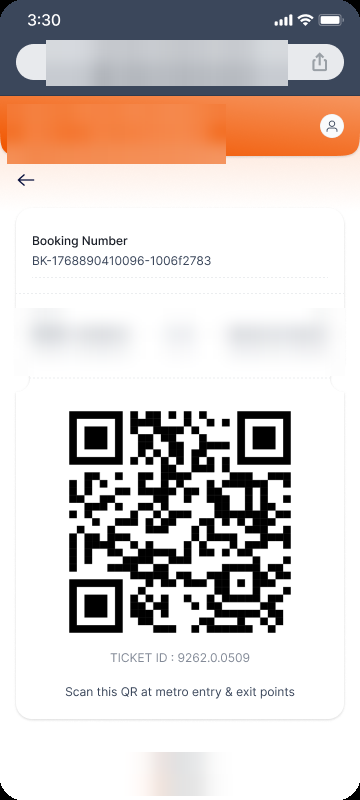 Click to zoom
Three calls that kept it drop-in.
Balance and one action, above everything
The wallet's job is to answer one question and offer one move. Balance is the headline; Add funds is the only primary button. History is the support act, not the lead, so the screen never feels like an account page.
Chips before keypads
Most top-ups are round numbers. Quick-amount chips (+100…+2000) cover the common case in one tap and only fall back to a keypad for custom values. That's the difference between a two-tap top-up and a typed form.
Sheet over page, so context stays
Top-up is a bottom-sheet, not a route change. The wallet stays visible behind the scrim, so funding feels like a quick aside rather than leaving and coming back. And the SDK never has to own navigation in the host app.
Same wallet, rendered for the desktop.
The SDK isn't mobile-only. The identical wallet (balance card, Add funds, the All/Credits/Debits history with search) reflows into a desktop layout when it's embedded in a web app, with richer rows (ref ID, time, method, transaction ID) the wider canvas can afford.
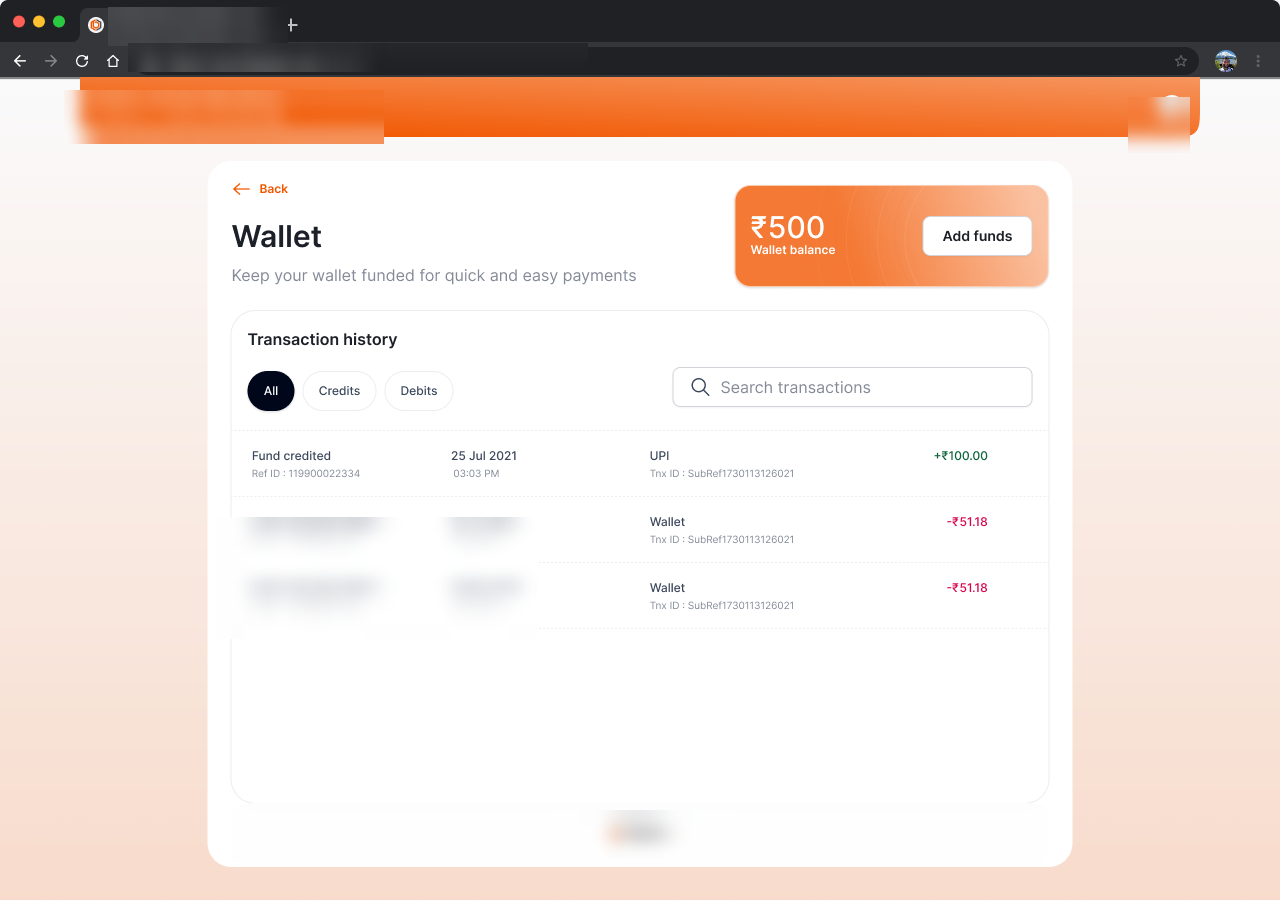 Click to zoom
Whitelabel: same SDK, a logistics partner's brand
The proof the wallet is a product, not a one-off: the identical SDK re-skinned for a logistics partner's prepay-&-ship flow. Metro's orange becomes a logistics partner's purple, and the top-up gets a context the metro never needed: a live shipment quote.
Orange to purple, nothing else moved.
This is the metro wallet wearing a logistics partner. Same balance card, same All/Credits/Debits history, same Add funds: the layout and components are untouched; only the brand layer (purple chrome, a logistics partner nav) changes. That's the whitelabel promise in one screen.
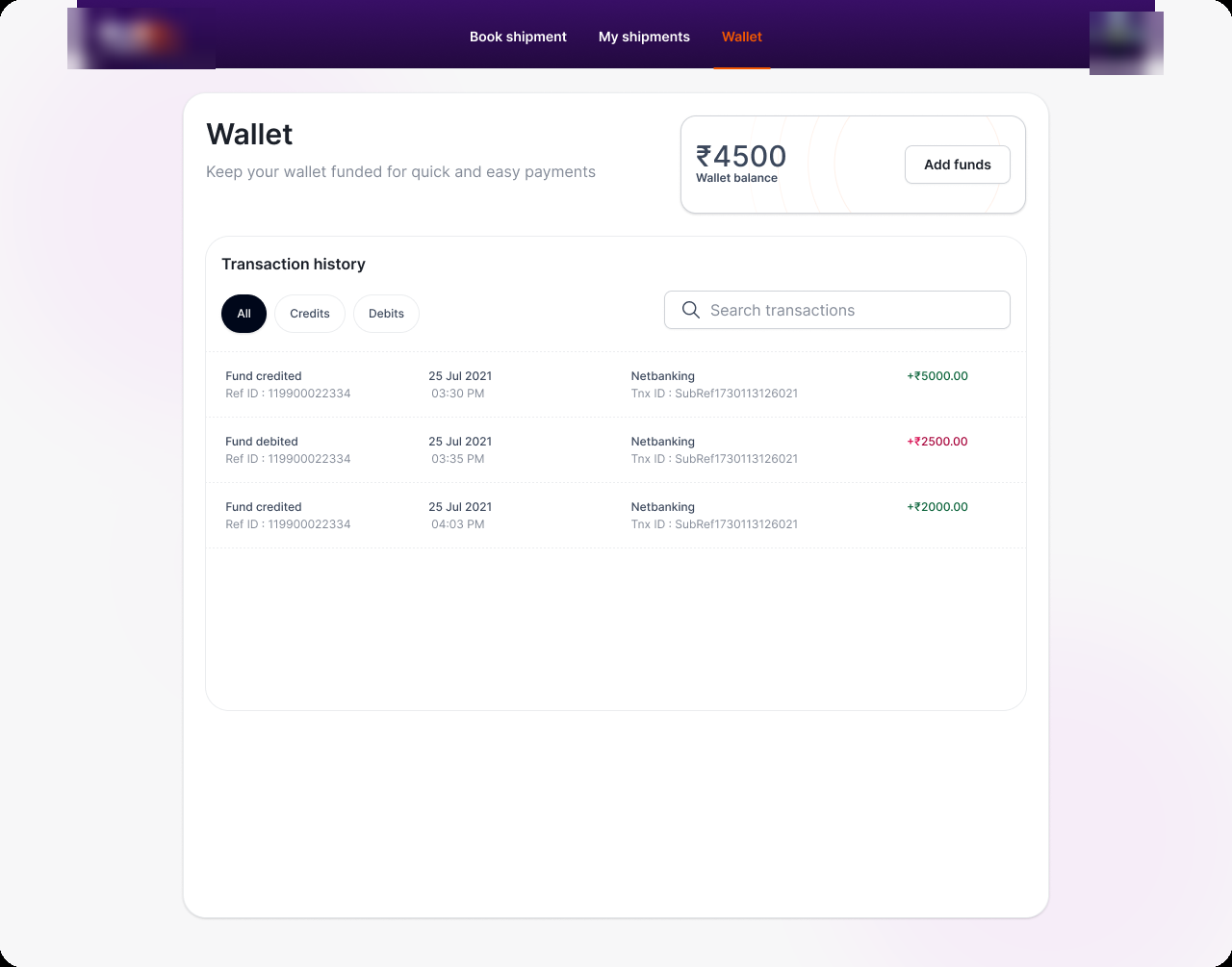 Click to zoom
Top-up that knows the shipment.
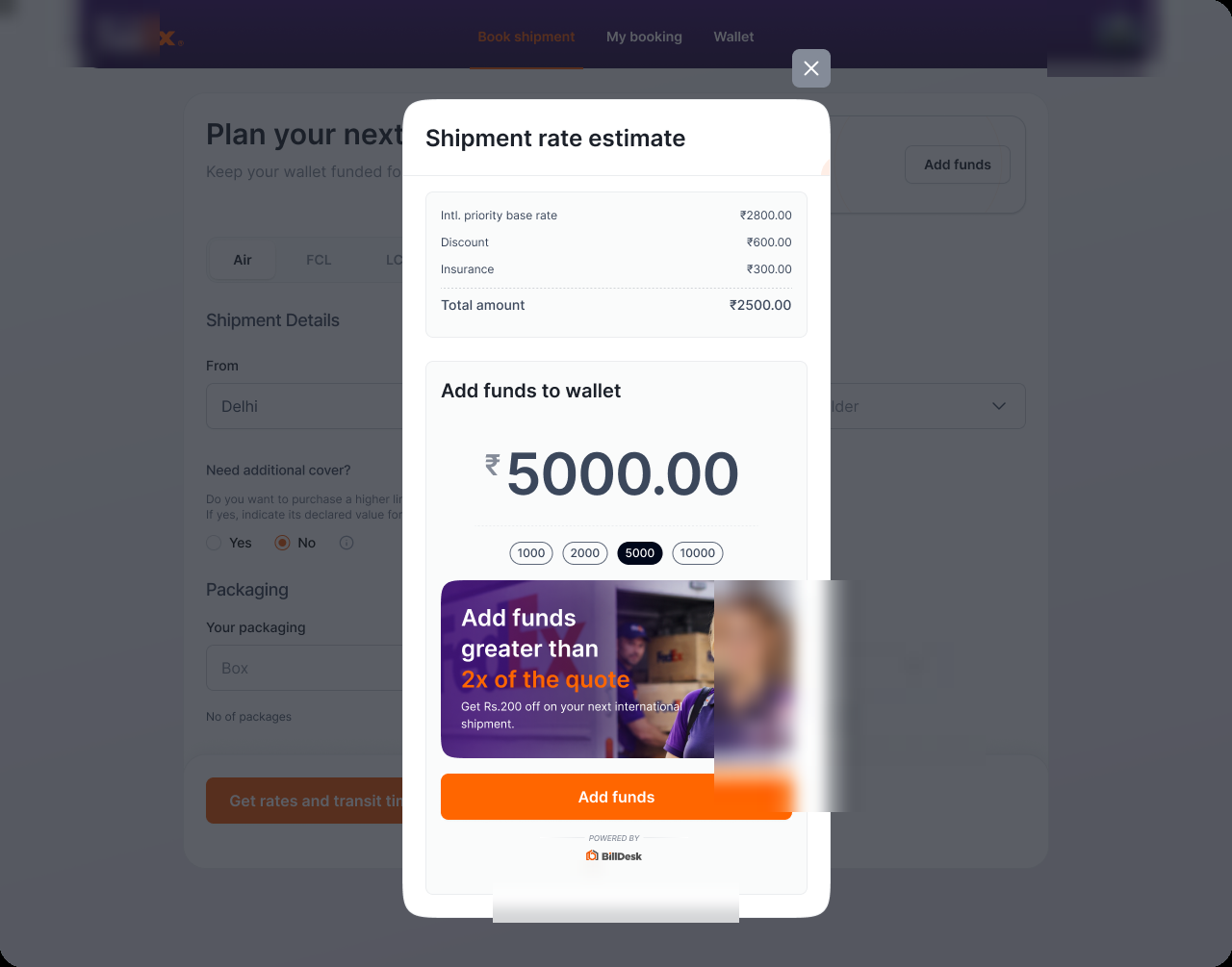
a logistics partner top-up isn't generic. It opens beside the shipment rate estimate, so the customer sees the total they need to cover. An upsell nudges them past it: fund more than 2× the quote and earn a discount on the next international shipment. Same top-up engine, a money-moment that fits the host.
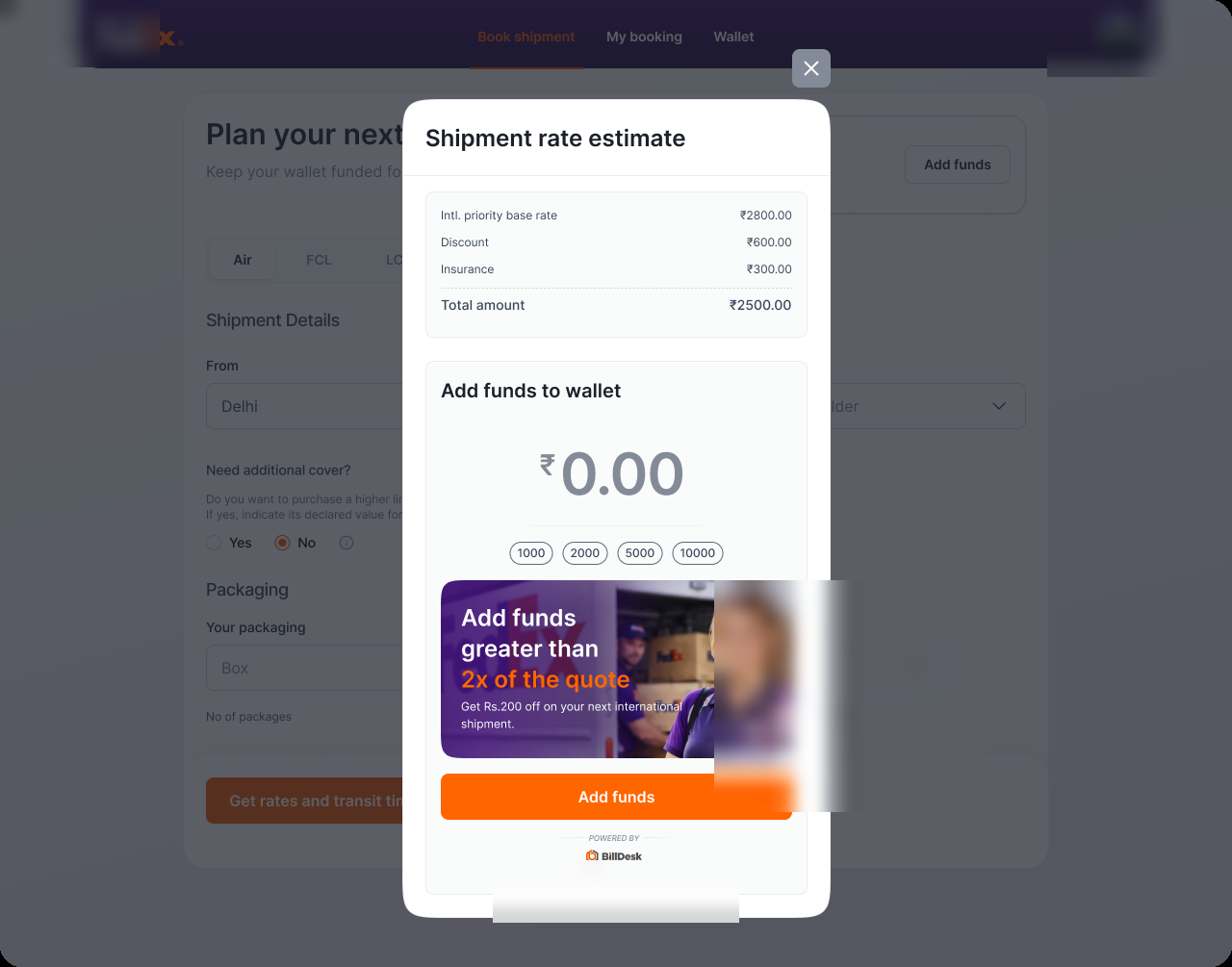 Click to zoom
The shipment rate estimate sits right above the amount, so the customer funds against a number they can see.
 Click to zoom
Funding past 2× the quote unlocks a next-shipment discount: stored value turned into a reason to load more.
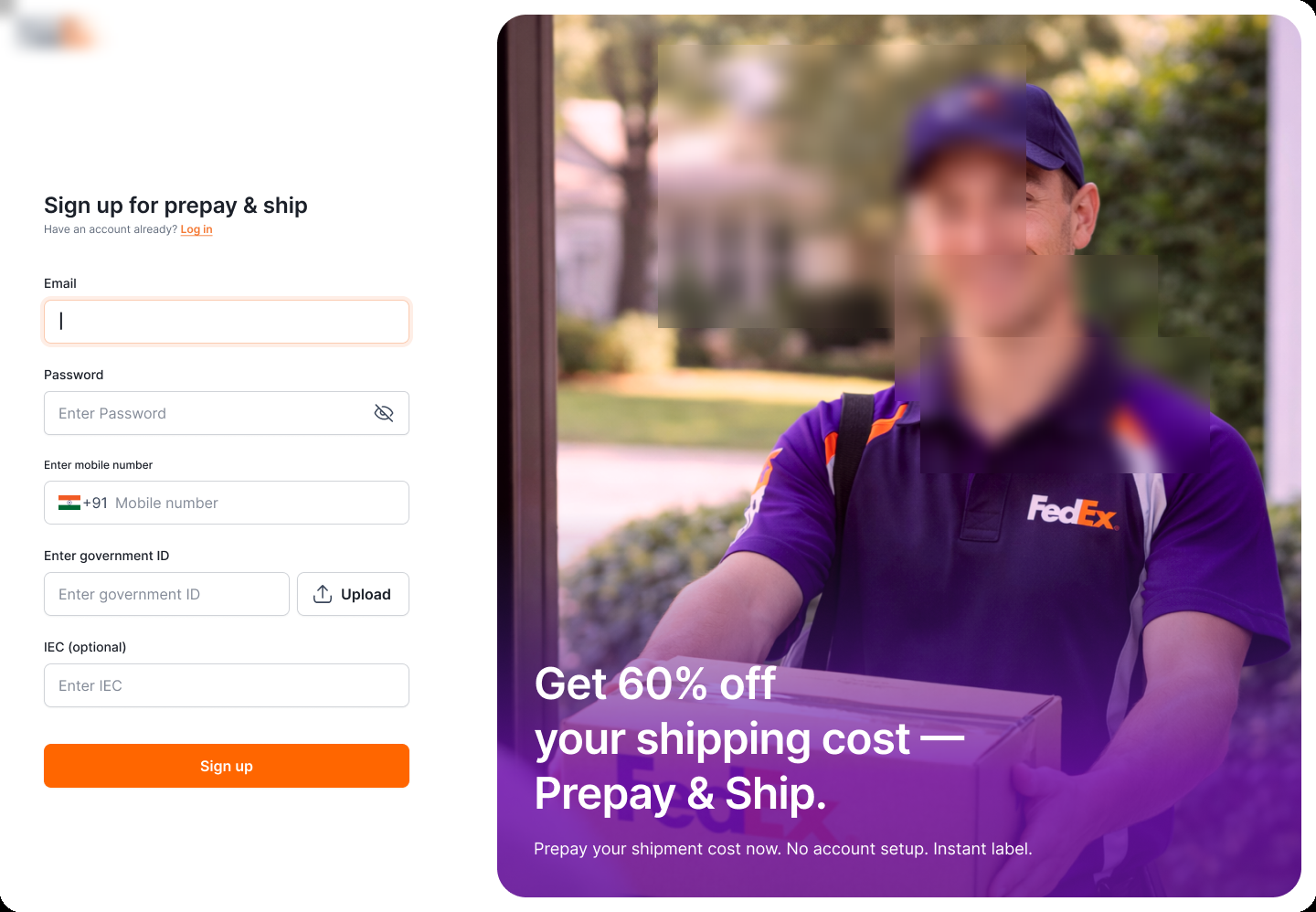
Sign-up belongs to the brand, too.
The theming reaches the front door. a logistics partner's "Prepay & Ship" sign-up, the entry to the prepaid wallet, is fully a logistics partner: its purple, its imagery, its offer (60% off, prepay now). The wallet stays a the payments fintech product underneath; the customer only ever sees a logistics partner.
 Click to zoom
The Admin Portal
The operator side: the payments fintech-branded back office that runs the wallet program. This unit covers the money dashboard, merchant onboarding, the spend ledger, and fund remittance with reconciliation.
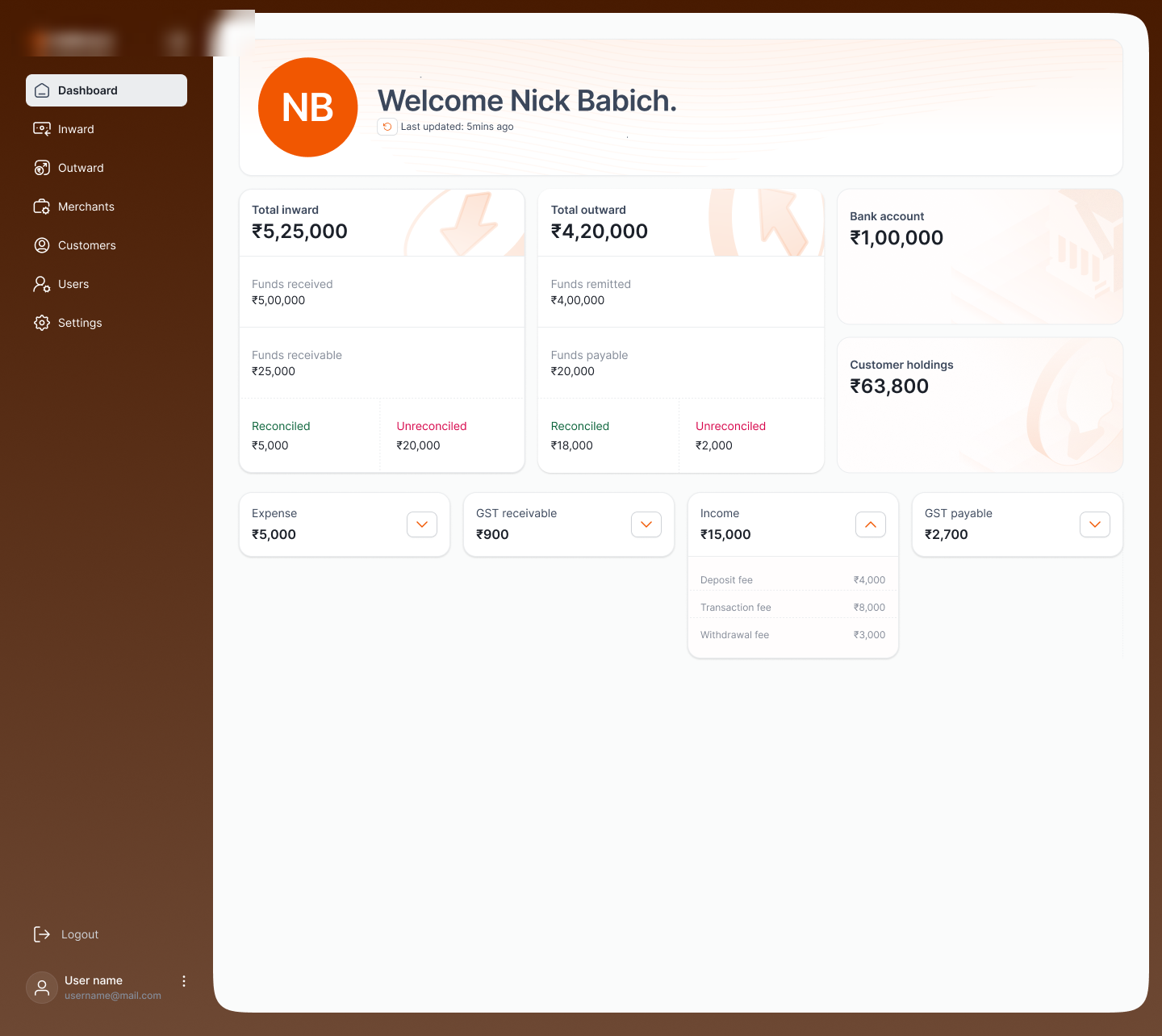
The money, in and out, at a glance.
The operator lands on the balance sheet of the program: total inward and outward, funds receivable and payable, what's reconciled versus unreconciled, the settlement account, and customer holdings (the float customers are carrying in their wallets). One screen says whether the program is balanced.
 Click to zoom
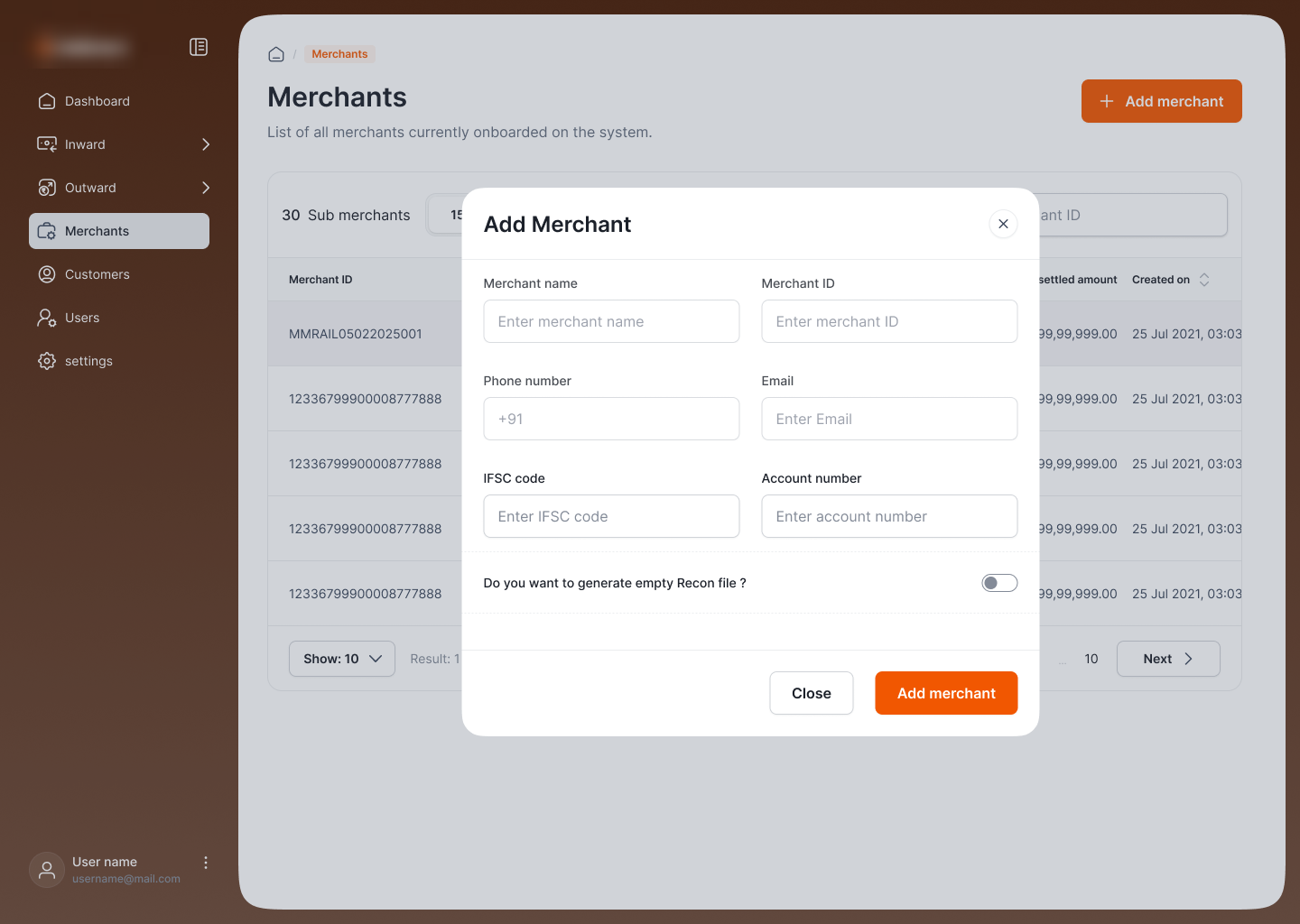
Onboard who gets paid.
Every party customers can pay, and their sub-merchants, is registered here. Adding one is a short modal: name, ID, contact, and the settlement details (IFSC, account) funds settle to, with an option to generate an empty reconciliation file. The registry is the spine the spend ledger and remittance both hang off.
 Click to zoom
Every rupee customers spent.
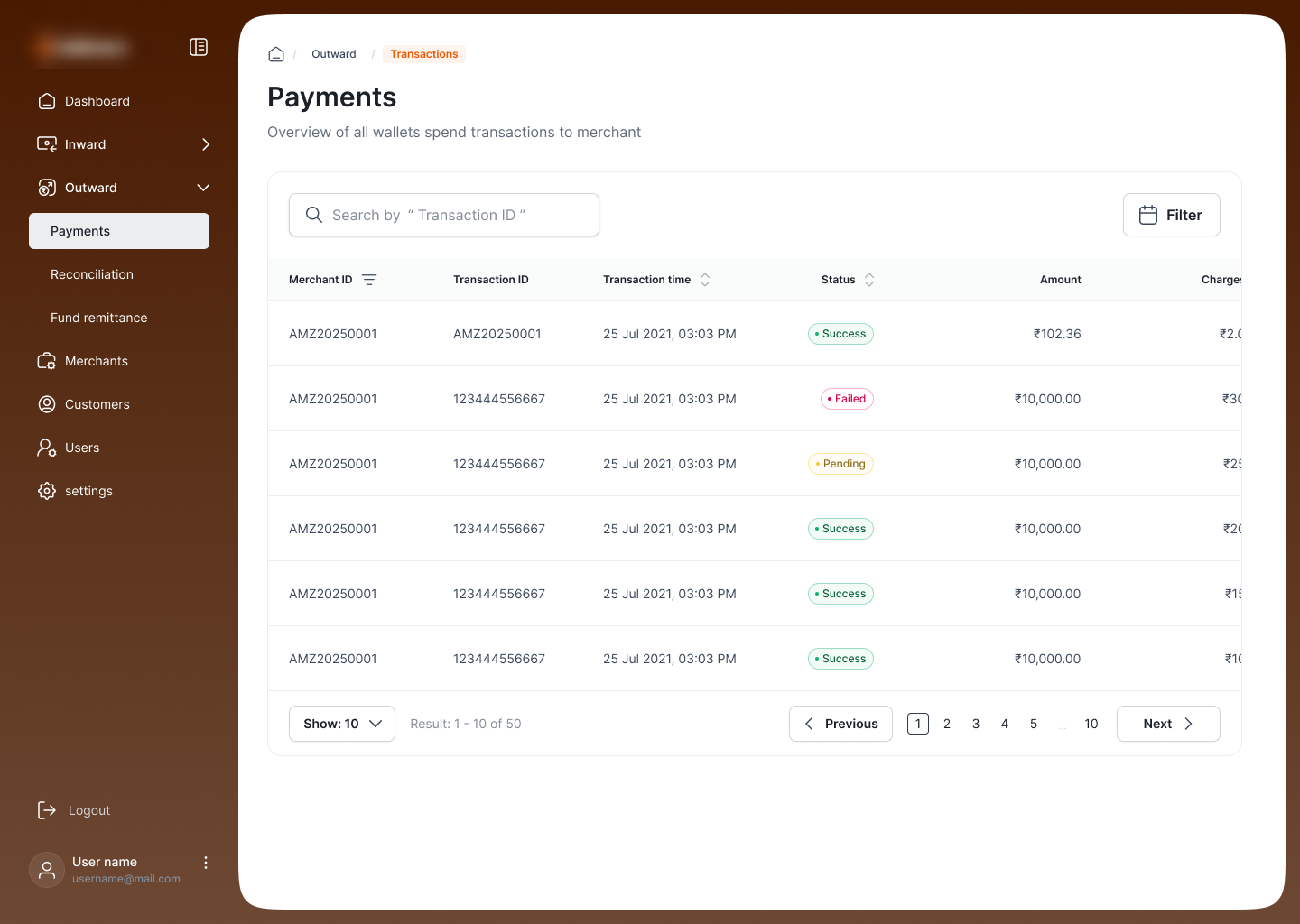
The Payments ledger under Outward lists all wallet spend to merchants: merchant ID, transaction ID, time, status (success / pending / failed), amount, charge, with search and filter. It's the operator's answer to "did that payment go through, and to whom?"
 Click to zoom
Settle the merchants, with the steps built in.
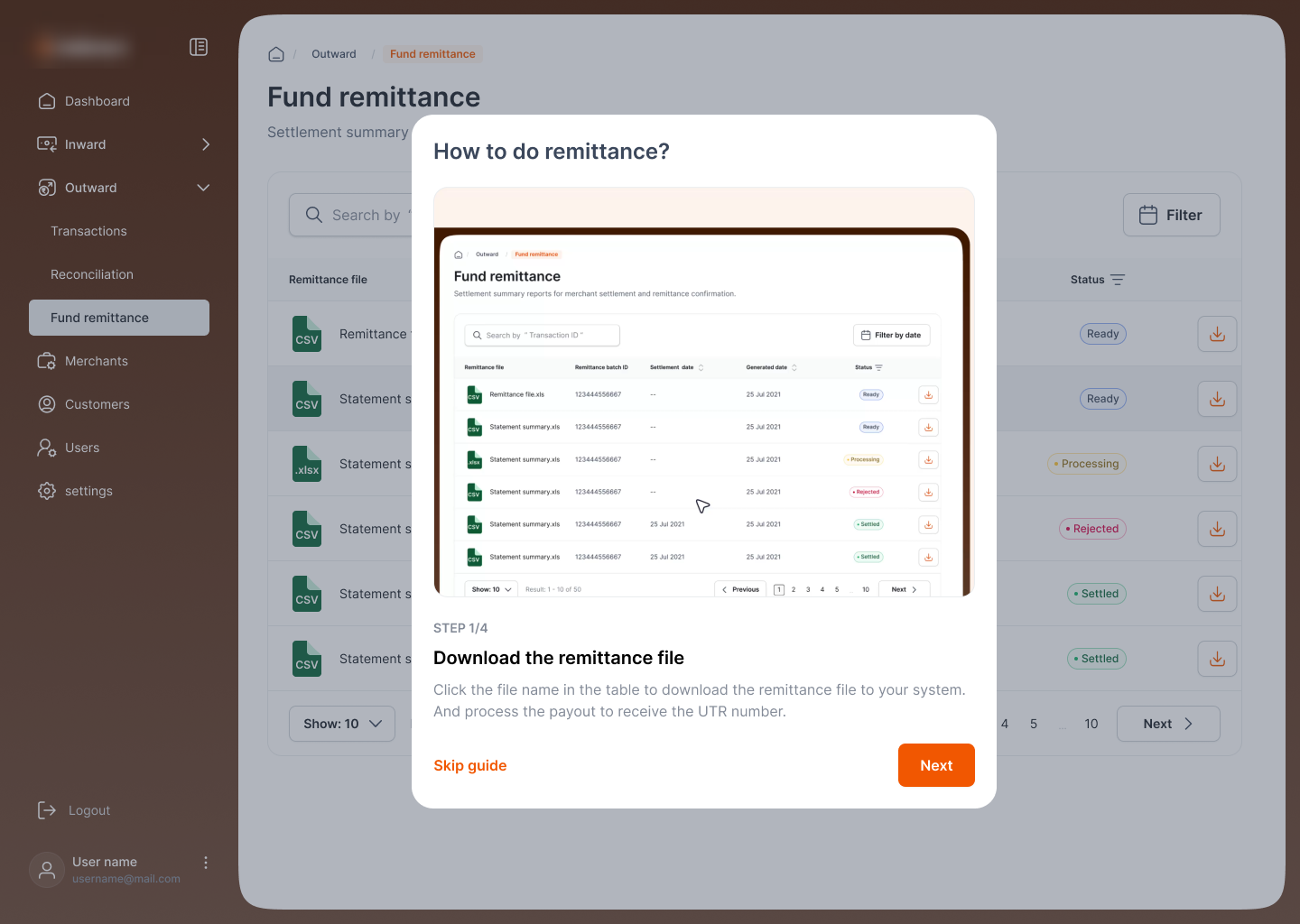
Remittance is the payout side: settlement files the operator downloads, processes, and confirms with a UTR. Because it's the highest-stakes job in the portal, the flow ships with an in-product "How to do remittance?" guide, a four-step walkthrough right where the work happens, so a new operator never has to leave to learn it.
 Click to zoom
One SDK, any merchant.
The whole point is that none of this is transit- or a logistics partner-specific. The wallet engine, the top-up, the pay, and the admin portal are constant; the brand is a theme layer and "Powered by the payments fintech" is the only fixed mark. Re-skin it, point it at a merchant, and the closed loop holds.
The closed loop generalizes
Fund a balance → spend it in one tap → operator settles the merchant. metro turns that into tickets at the gate; a logistics partner into prepaid shipping with a 2× upsell. Any high-frequency, low-friction merchant (transit, logistics, canteens, campuses) drops into the same loop without new wallet code.
What shipped.
The wallet went live as two real whitelabels off one codebase, with the operator portal running the program behind them.
- Two live whitelabels from one SDK: a metro operator ticketing and a logistics partner prepay-&-ship, re-skinned, not rebuilt.
- Mobile web and desktop from the same SDK: the wallet reflows to its host surface.
- Program operated end-to-end: merchant onboarding, spend visibility, remittance, and reconciliation in one admin portal.
- One-tap spend on stored value: funded balance pays instantly, no per-transaction re-auth.
Where the wallet goes next.
Auto-reload & low-balance
Top up automatically below a threshold, so a ride or shipment never fails for an empty wallet.
Rewards on stored value
Generalize a logistics partner's 2× nudge into cashback and tiered rewards any host can switch on.
Refund to wallet
Send reversals back to balance for instant re-spend instead of a slow refund cycle.
One honest learning.
The wallet screen was the easy part; the top-up was where the product lived. Most of the design effort went into making funding feel like nothing: chips over keypads, a sheet over a page, and, on a logistics partner, anchoring the amount to a number the customer already had in mind. Get the money-in moment frictionless and the rest of the wallet takes care of itself.